USD · One Admin account per plan · Monthly plans renew monthly; Unlimited Annual renews yearly until canceled.
How credits and sessions work
A $3 credit is used when an authorized connection starts. It stays with that one Client’s help session, including Admin reconnects. It ends when the Client clicks End help or closes ConnectMe; an offline Client expires after 90 seconds. Unused credits stay in your account. The free trial and all included subscription sessions last up to 30 minutes. Unlimited Annual has no connection-count limit while the subscription is active. Available trial or plan sessions are used before credits. No automatic overage charges.
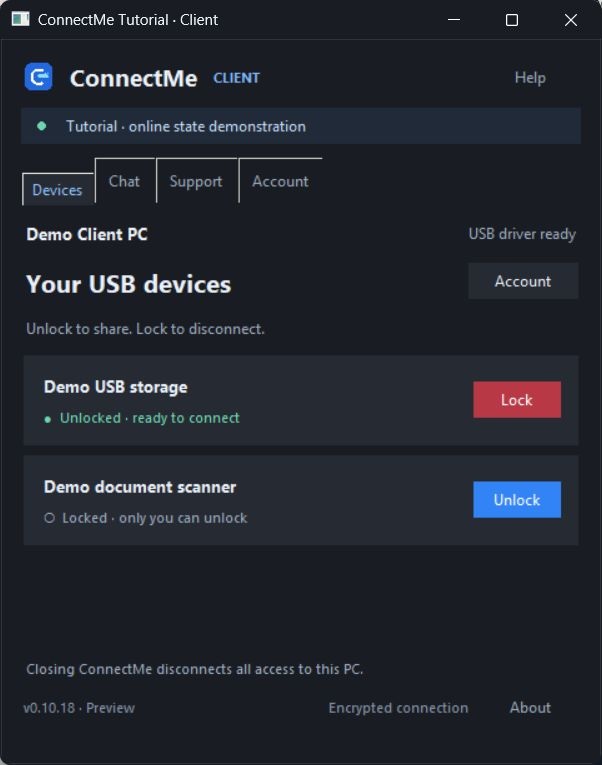
Actual app windows (0.10.17–0.10.18). Accounts, devices, conversation and screen content are demonstrations. Click any photo to enlarge.
USB workspaceSee named Clients and connect to their unlocked USB devices.Client USB sharingConnect automatically when you open the app. Use blue Unlock to share a USB, red Lock to block it, or close the app to disconnect.Screen assistanceThe actual viewer showing a local demonstration image, with Chat, Send file and Disconnect controls.Chat in the appKeep talking alongside USB or screen assistance.Pairing & accountCreate a pairing code, check credits and trial time, or open billing.Screen-control approvalThe Client can allow or decline a screen-control request.File deliveryThe Client chooses where an incoming file is saved. Files never open automatically.Request an unlockSuper Admin can request a locked USB. The Client can unlock it or keep it locked.
Download and open ConnectMe-Client.exe. Missing USB drivers install automatically, then ConnectMe opens. Python is included. Windows approval or a restart may be required.
Hotspot RepairsYour support team
Checking support hours…Mon–Fri · 10 a.m.–5 p.m. Central Time
LET’S GET YOU CONNECTED
How can we help?
Tell us a little about your question. You can keep browsing while we chat.
✓
Message received.
Your request is in our support inbox. We’ll follow up by email during our support hours.